The Ultimate Guide to Steam Machines: Revolutionizing Living Room PC Gaming
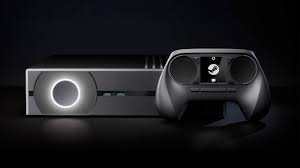
Back in 2013, gamers dreamed of blending the raw power of a PC with the easy setup of a console. Sales of consoles like the PlayStation 3 hit over 87 million units by then, yet many wanted more from their living room setups. Enter the Steam Machine—a bold idea from Valve to turn your TV into a PC gaming hub. This device aimed to deliver top-notch games right from your couch, using Steam’s vast library. Announced at Steam Dev Days that year, it sparked huge buzz. The community hoped it would crush the divide between consoles and PCs.
Section 1: Deconstructing the Steam Machine Concept
What Was SteamOS and Why Was It Crucial?
SteamOS served as the heart of the Steam Machine. Valve built it on Linux to run games smoothly on a TV screen. It leaned on Big Picture Mode, Steam’s full-screen interface made for controllers and couches.
This OS aimed to mimic console simplicity. No need for a mouse or desk—just plug in and play. Yet, it faced hurdles with game support. Many titles came for Windows, so SteamOS used tools like WINE to run them. Proton later improved this, but early days proved rough.
Think of SteamOS as a custom engine for your gaming car. It stripped away extras to focus on fun. Without it, the Steam Machine idea would flop. It pushed Linux into homes, a big shift for PC fans.
Hardware Variations: From DIY to Major Manufacturers
Steam Machines came in all shapes and sizes. Valve let builders create their own or buy from big names. This differed from locked consoles like the Xbox.
Entry models hit around $500, good for casual play. High-end ones reached $5,000 for beastly performance. Companies like Alienware and Zotac jumped in. The Alienware Aurora stood out with its sleek case and strong GPU. Zotac’s NEN series packed mini power for tight spaces.
DIY fans loved the freedom. Pick parts to fit your budget and needs. This mix drew crowds but confused some buyers. Prices varied wild, from basic to pro-level rigs.
The Steam Controller: An Essential Companion
The Steam Controller changed how we input on TVs. It swapped sticks for two trackpads that mimicked a mouse. This let PC games feel right on a couch.
Each pad gave haptic feedback, like tiny vibrations for aim tweaks. Buttons and triggers added analog feel for shooters or racers. Valve designed it to handle any game type.
At first, it took practice. But once you got it, precision soared. Pair it with SteamOS, and you had a full console vibe. Today, it inspires newer pads, proving its smart design.
Section 2: The Initial Challenges and Market Friction
The Software Compatibility Barrier: The Linux Hurdle
Linux scared off many gamers. Most big titles launched on Windows only. Steam Machines ran SteamOS, so ports lagged behind.
Early users hit bugs with WINE. Games crashed or ran slow. Some switched to Windows on their machines, defeating the point. Valve worked on fixes, but trust dipped fast.
Why the push to Linux? Valve wanted an open path, free from one company’s rules. Still, the jump proved too steep for most. It left Steam Machines feeling half-baked.
Pricing vs. Performance Perception
Buyers eyed Steam Machines with doubt. Many cost as much as solid Windows PCs. Yet, they lacked full game access.
A $700 model might match a $600 Dell tower. But that Dell ran every title out of the box. Steam versions felt locked, like pricey experiments.
Word spread online. Forums called them overkill for Linux fans only. Sales stalled as folks stuck to safe bets. Price tags killed the hype quick.
Competition from Established Console Giants
PlayStation 4 and Xbox One ruled in 2013. They sold millions fast, with simple setups. No tweaks needed—just pop in a disc.
Steam Machines tried to join the fight. But consoles had years of polish. Their stores brimmed with exclusives. Steam’s library shone, yet access felt clunky.
Kids and families picked the easy win. Why risk a new system? Giants like Sony built trust. Steam Machines played catch-up from day one.
Section 3: Evolution and Legacy: The Indirect Success of the Concept
The Pivot: SteamOS 2.0 and the Rise of Proton
Valve learned from flops. They updated SteamOS to version 2.0, adding better tools. Proton emerged as a game-changer.
Built on WINE, Proton runs Windows games on Linux with ease. Now, over 18,000 titles work without hassle. It hides the tech, so you just play.
This shift saved the vision. No more hardware push. Focus turned to software that works anywhere. Linux gaming boomed, thanks to these tweaks.
The Steam Deck: The True Spiritual Successor
The Steam Deck nails what Steam Machines missed. It’s a handheld PC that hooks to your TV. Play anywhere, then dock for big-screen action.
Launched in 2022, it sold out quick. Over a million units moved in year one. Proton powers it, running most Steam games smooth.
You get PC power in your pocket. No bulky box needed. It lowers the bar for couch gaming. Deck proves the idea lives on, just smarter.
The Modern Living Room PC Landscape
Today, small PCs fill the gap. Intel NUCs or mini-ITX builds fit anywhere. Run Windows with Big Picture Mode for console feels.
These setups cost less and pack more punch. Add a good controller, and you’re set. No need for old Steam hardware.
Custom rigs let you tweak for quiet nights. GPUs like NVIDIA’s handle 4K easy. The market grew open, thanks to Valve’s spark.
Section 4: Actionable Steps for Modern Living Room PC Gamers
Building Your Own “Steam Machine” Today (The DIY Route)
Start with a small case for your build. Aim for quiet fans to keep movie nights peaceful. Pick an AMD Ryzen CPU—it’s strong and cheap.
For graphics, grab an NVIDIA RTX 3060. It handles high frames at 1080p. Balance power with heat; use good airflow.
Budget $800 to $1,200. Test parts on PCPartPicker first. Assemble, install Windows or Linux, and hook to your TV. You’ll have a custom beast in hours.
- Choose a mini-ITX motherboard for compactness.
- Add 16GB RAM for smooth multitasking.
- Opt for SSD storage to cut load times.
Optimizing Steam Big Picture Mode for Couch Play
Open Steam and switch to Big Picture. Bump UI scale to 150% for TV views. It makes icons big and easy to tap.
Set your controller as default. Map buttons for quick access. Turn on full-screen for no distractions.
Adjust remote play if needed. Stream from another PC for extra power. Test games to fine-tune. Now, your setup flows like a console.
- Enable auto-login to skip boot hassles.
- Customize shortcuts for favorites.
- Use broadcast for friends to watch.
Leveraging Remote Play Together and Streaming
Remote Play lets you beam games to TV. Link a cheap device like a Raspberry Pi. Your main PC does the heavy lift.
Invite pals for co-op fun. They join from their gear. No extra buys needed—just a solid net.
Stream to Chromecast or smart TVs too. Access your full library anywhere. It echoes Steam Machine dreams, but better.
- Check your upload speed first—aim for 15Mbps.
- Set quality to high for crisp visuals.
- Update Steam often for bug fixes.
Conclusion: Where the Steam Machine Concept Stands Now
The Steam Machine hardware faded, but its spark endures. Valve’s push for couch PC gaming shaped tools we use today. Proton and the Deck turned ideas into wins.
Key takeaways:
- SteamOS paved Linux’s road in gaming, now vital for handhelds.
- Controllers evolved from early tries, boosting couch play.
- DIY builds and streaming fill the living room void with ease.
- The legacy? More access to games, your way.
Grab your setup and dive in. The future of TV gaming waits.